 Hush
Install and enable
- Download the Hush APK on an Android 10+ device. Open the file and follow Android’s install prompts. If prompted, allow installs from the browser or file manager you’re using.
- Open Hush, tap Enable call screening, and select Hush in Android’s caller ID and spam prompt.
- Return to Home and check that Call protection is on and the status reads Protection is active.
Android uses one caller ID and spam provider at a time. Your phone app still handles dialing and answering. Install over a compatible, previously signed Hush build to keep settings, rules, and history.
Verify the APK with SHA-256
Compare the checksum of your file to the signed release hosted on this site.
c8dd06ec8ab0e239c9895155e60736c4bab77e960de36858dfb96d9a4b8097f2Screening preferences
Open Rules → Screening preferences to choose how Hush treats different call types.
- 140 promotional
- Built-in rules match common local and international representations of India’s 140 promotional series.
- Transactional 160 series
- Opt in when you want to filter this series. It may include legitimate service calls. The global switch and the individual built-in rule must both be enabled.
- Spoofed numbers
- On Android 11 and newer, decline calls with failed carrier verification. Calls with no verdict can still pass this check.
- Unknown and private callers
- Apply filtering to unknown or private callers when Android delivers those calls to Hush.
Custom rules
Open Rules → Add rule, enter a regular expression, and save it. Hush validates patterns before saving. Use the switch on each rule to enable or pause it, or remove the rule from its card.
Patterns match the entire phone number as Android supplies it. Account for country codes, leading zeros, and spaces when writing a pattern. Hush supports up to 100 custom rules and 256 characters per pattern. RE2 syntax excludes lookaround and backreferences.
^0?140\d+$This example matches local 140-series numbers with or without a leading zero.
Try a number
Open Rules → Try a number, enter a sample phone number, and tap Test number. A green result means Hush would allow the number. A red result shows the matching rule and means Hush would decline it. The test uses your current rules and protection settings and simulates no carrier verdict.
Cloud rules
Use Rules → Sync now to check the approved feed. Hush also checks on app open, when a validated connection returns while it is running, and through Android’s periodic background work. Android can delay background refreshes.
Synced rules work offline. A cloud rule that matches an existing local pattern is skipped. If you disable a cloud rule, that choice survives a refresh. Rules withdrawn from the library are removed from the app after a successful sync.
History and appearance
Home shows the retained declined-call count. History groups declined calls by day and displays the latest 1,000 records from a rolling on-device log of up to 10,000 calls. Use Clear history to delete the records.
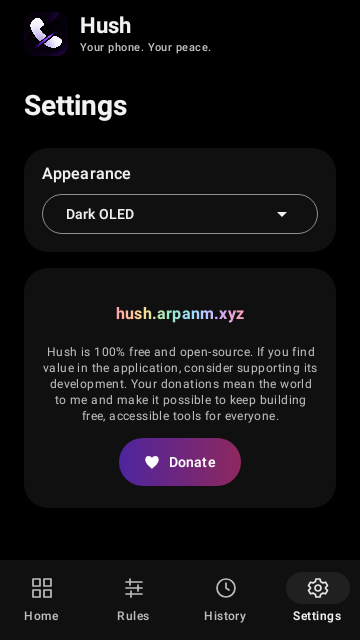
Choose Dark, White, or Dark OLED from the Settings → Appearance dropdown. Dark OLED uses a pure black background. Hush remembers your choice.
Privacy
Hush evaluates rules on your phone and stores its own history in app-private storage. Android backup is disabled. The cloud rules request downloads the published feed and sends no phone numbers, call history, or custom rules.
The website and rule library are separate from call screening. Hush can continue using its saved rules while offline.
Android behavior
- Android sends eligible telephone calls to Hush. Calls from saved contacts can bypass third-party screening without contacts access, which Hush does not request.
- Restricted or unavailable caller IDs may bypass the app. Hush handles telephone calls delivered through Android’s screening API. VoIP apps manage their own calls.
- Carrier verification is available from Android 11 and depends on the carrier. A failed verdict is a screening signal.
- A declined call may still appear in the phone app’s call log. Android and your device maker control call log and notification behavior.
- Hush lets calls through if its screening configuration is still loading when the response is due.
Build from source
Hush is an open-source Android project built with Kotlin and Jetpack Compose. Room and DataStore hold the local rules and settings. RE2/J evaluates patterns and WorkManager schedules rule sync.
From an Android source checkout, use JDK 17 and Android SDK platform 35. Set the SDK location, then run the Gradle wrapper.
./gradlew testDebugUnitTest
./gradlew lintDebug
./gradlew assembleDebug
The debug APK is written to app/build/outputs/apk/debug/. Use your own signing configuration for distribution.